A FIELD GUIDE TO THE CRAZYGAMES BUILD
Questions, and whether the client answers them
A FAQ is where puzzle guides usually start guessing. Each answer below says where it came from, and the ones we cannot answer say so.
How do you take a screw off the board?
Click it. One click, one screw. There is no drag and no confirm step; the screw leaves the plate and lands in its container in the same frame.
What do the containers want?
Three screws of their own colour. The seventh tutorial sentence the game never says: a container disappears when it is full, and that is progress, not a mistake.
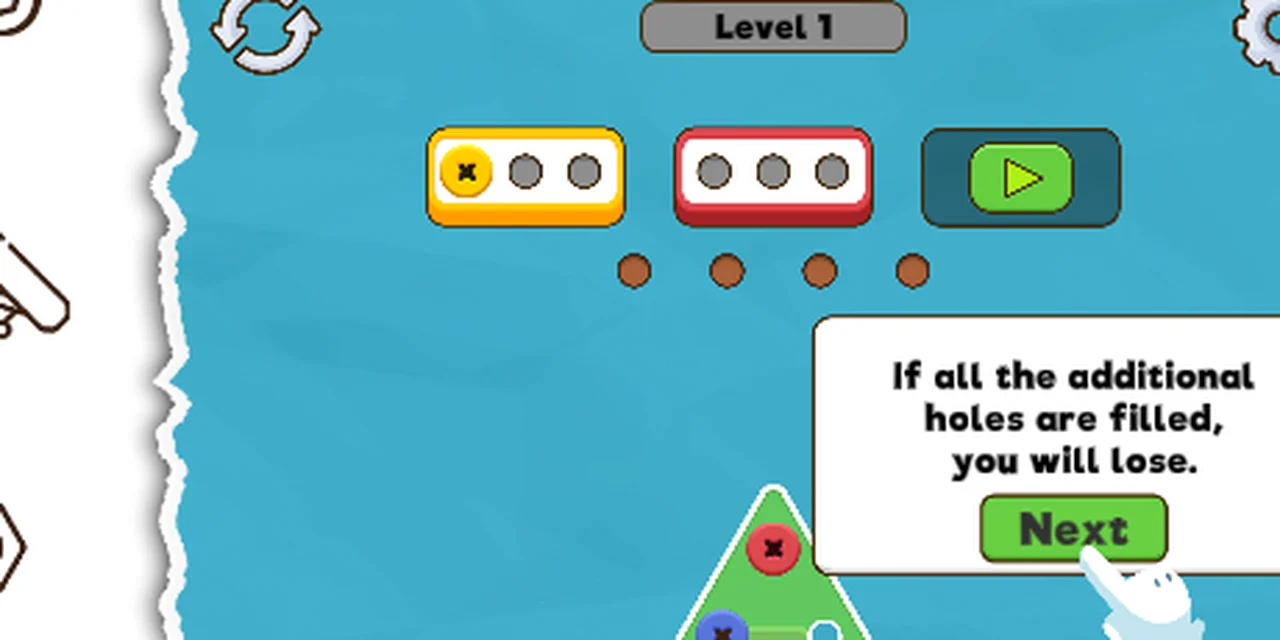
What are the four brown dots?
Spare holes. A screw whose colour has no container on the HUD parks in one. The second tutorial bubble states the penalty in the client's own words: "If all the additional holes are filled, you will lose."
Is there a level select?
We have not found one. The build drops you straight into a level from the title card, and after clearing it you return to the title card. What the five coloured screws on that card do is on our not-tested list.
Can you undo a move?
There is a round restart arrow in the top left of the HUD. We have not pressed it, so we cannot say whether it undoes one screw or resets the level. It is listed below rather than guessed at.
Does the game save progress?
The portal offers a login and a "don't lose your progress" prompt, which suggests it does. We played signed out and did not test whether clearing level 1 survives a refresh.
What we cannot answer yet
- How many levels there are.
- What the four tools in the tray cost and do.
- What the purple-and-blue pill under the container on level 2 counts.
- Whether coins carry between sessions.
Last checked against the client: 2026-11-07 · client web build 2026-11-07