A FIELD GUIDE TO THE CRAZYGAMES BUILD
The tray: four tools, every one of them at zero
Under every board sits the same pink tray with four pictures and four green counters. All four counters read 0, and we have not bought any of them.
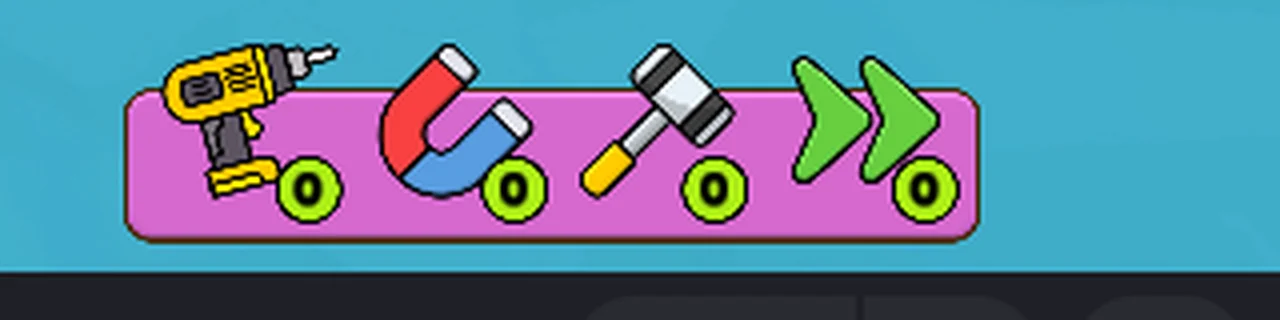
What is in the tray
Four pictures, left to right, each with a small green counter underneath. On a brand new save every counter reads 0, which is the first thing to understand: these are not permanent abilities.
| # | the picture | the counter | what we know |
|---|---|---|---|
| 1 | a yellow cordless drill | 0 | nothing beyond the drawing |
| 2 | a horseshoe magnet, red on one arm and blue on the other | 0 | nothing beyond the drawing |
| 3 | a hammer with a yellow handle and a white head | 0 | nothing beyond the drawing |
| 4 | a green double chevron pointing right | 0 | nothing beyond the drawing |
The counters are what makes the row a shop rather than a menu. A tool you own would show a number; all four showing zero means the row is for things you have not bought yet.
Where the money comes from
Clearing a level pays 100 coins, printed on the completion card between LEVEL COMPLETED! and the
Next button. We have seen that card once, on level 1, and we have not found a shop screen, a price
list, or any way to spend the coins in the run we played.
So the honest reading of the tray is this: the game has a currency, a reward per level, and four consumables with prices we have not seen. That is an inference from three frames, not a rule we can state.
Why we are not guessing what they do
A drill, a magnet, a hammer and a skip arrow are easy to guess at, and every guess would be wrong in some detail: does the drill remove one screw or one plate? Does the magnet pull a screw to its container, or pull it out of a spare hole? Does the double arrow skip the level, or fast-forward an animation? Guessing here would produce exactly the kind of page this site is meant not to have.
How to make this page concrete
The cheapest experiment is the one we have not run: clear a level, keep the coins, and look for a shop between levels. If the tray is clickable at 0, clicking it is the next thing to try. Until one of those produces a frame, the table above stays a list of drawings and counters.
Not tested
- Whether the tools are bought with coins, with portal currency, or unlocked by progress.
- What each tool does when used.
- Whether a tool is one use per level or one use per purchase.
- Whether the counters persist between sessions.
- Whether a tool can be used twice in the same level.
- Whether the tray changes on later levels.
Last checked against the client: 2026-11-07 · client web build 2026-11-07